¶ Software Guide
This section provides software download links, installation guides, operating instructions, and recommended settings for the Tyvok P2 laser engraver.
¶ Supported Software
¶ 1. LightBurn
LightBurn is a professional laser control software compatible with the Tyvok P2, providing advanced editing, layer management, and engraving control.
¶ Guide
¶ 2. TyvokStudio
TyvokStudio is Tyvok's official laser engraving software. It supports device connection, parameter configuration, engraving, framing, project management, and firmware management.
¶ User Guide
¶ Video Tutorial
¶ Important Notes
Please review the following information before using TyvokStudio with the Tyvok P2.
- The Reset function is not applicable to the Tyvok P2 because it uses a galvo scanning system rather than a traditional X/Y gantry system.
- If clicking Reset displays "Function / Setting Disabled!" or "The Control System Is Busy!", this is normal behavior and does not indicate a hardware or software fault.
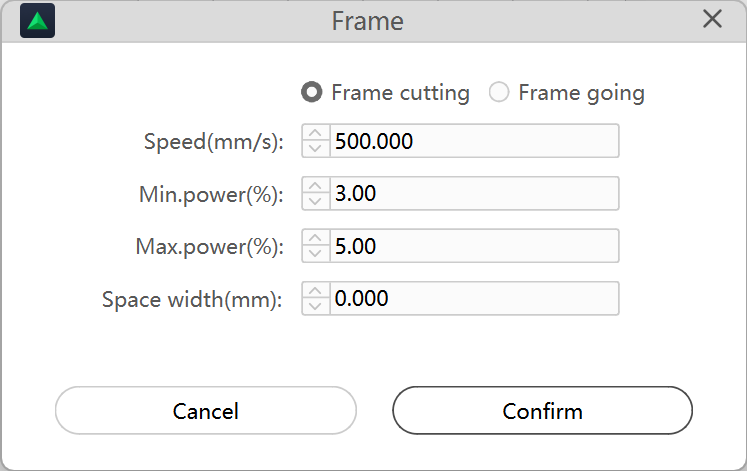
- For job preview, we recommend using Frame Cutting instead of Frame Going.
- When using Frame Cutting, always use the recommended preview parameters to avoid accidentally engraving or cutting the material.
Tip
TyvokStudio is continuously improved and updated. The interface and available features may vary slightly between versions. Please refer to the latest software release and this Wiki for the most up-to-date instructions.
¶ 3. LaserGRBL
LaserGRBL is a free GRBL-compatible laser engraving software for Windows.
¶ Guide
¶ Firmware
For users using LaserGRBL only.
If your Tyvok P2 was manufactured before March 30, 2026, please update the firmware below before using LaserGRBL.
¶ 4. Mantisolo
Mantisolo is Tyvok's mobile application for wireless operation and project management.
¶ User Guide
¶ Material Parameters
The following settings are recommended as a starting point. Actual parameters may vary depending on material type, thickness, surface finish, and engraving requirements.
¶ Kraft Paper
| Item | Value |
|---|---|
| Applicable For | Vector / Bitmap |
| Laser Module | 2W |
| Power | 100% |
| Speed | 5–30 mm/s |
¶ Wood
| Item | Value |
|---|---|
| Applicable For | Vector / Bitmap |
| Laser Module | 2W |
| Power | 100% |
| Speed | 5–20 mm/s |
¶ General Notes
- Ensure the Tyvok P2 is properly connected before starting any job.
- Import the correct device profile or configuration file when required.
- Always perform a frame preview before engraving.
- Start with the recommended material parameters and fine-tune them according to your material.
- Clean the laser lens regularly to maintain engraving quality.
- Wear appropriate laser safety glasses during operation.
- Never leave the machine unattended while engraving or cutting.
¶ Related Documents
¶ Software Download
Download the latest version of the supported software below.